Pages

Sunday, February 16, 2014

Increase your internet Speed and computer speed


Slow internet connection and computer really costs time and makes feel annoying. it is possible to make your internet much better then it was in the past.

1.Goto run and type "msconfig"  by pressing "Windows key + R".


2.Then goto "Startup" tab and untick the "unnecessary updates" and "startup programs".


3.Hit the "OK" button.

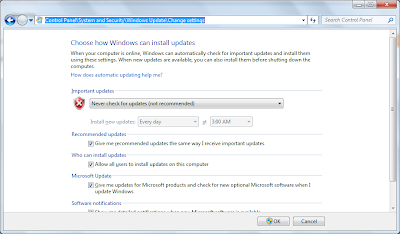
4.and also off the "windows update" .you can find windows update at 
"Control Panel\System and Security\Windows Update\Change settings"


Some basic Tricks :-

1. Use "IDM" To Boost your Downloading Speed.
2. Use A  Anti-virus in your Computer.
3. Remove all Unwanted Add-ons, Software,unwanted files form your Computer.

How to unlock android phone


Android phone user use the inbuilt unlock pattern for give security to there phones this is very easy to use but some time to take many wrong attempts it locked permanently after that you need to enter the user id you enter in the google play store to unlock phone but there is some problems to unlock again if u stop data usage in your so it can’t be connected with internet and then you cannot unlock phone without this trick. sometime user needs to go to care center and then give some money to unlock it again so this is costly you need to pay here is a trick How To Unlock an Android Pattern Just follow these simple steps to unlock your phone.
There might be different GUI  for different mobiles.

Steps :

1.Switch off you android phone.


2.Then press both volume up and power on button togather.

3.Now you will see the boot screen of android phone.

4.Use volume key for up or down.(sometime both the keys)

5.goto "wipe data/factory reset".


6.Press home button on  "wipe data/factory reset" option.after that mobile will take some time and it will      restart . now your android phone is unlocked. 


Note: you all installed apps will be deleted.

How to use ping command


Ping stands for "Packet InterNet Groper" . The ping command is commonly used to check for network errors. Ping command used to verify if a network data packet is capable of being distributed to an address without errors. This command used in windows and linux etc.

Syntax :

ping target_host  [-options]


Examples:

ping google.com -t

ping 192.168.1.1 -t

The above ping command continuously  sends the packet to the target host until the user presses "Ctrl+c"


How to use proxy server


Sometimes users cannot access some of the website because the users ip is blocked from that server. for eg. some part of China not able to access  facebook website .
In order to get round these restrictions, users should know how to use proxy servers . This article will give a brief explanation about the use of proxies.
I'm using opera browser. There may be different GUI of different browsers.

Step 1:
Goto website http://hidemyass.com/proxy-list and copy one of the ip address , port .


Step 2: 

Open opera browser and goto  "Settings >> Preferences " or directly press"Ctrl+F12"


Step 3:
Goto "Advanced >> Network >> Proxy server >>" enter the ip address you copied from 1st step.


Step 4: 
You are now ready to go. you can check your new ip address on going  http://www.whatismyip.com.
and browse over the internet anonymously.(only for education purpose).

نتائج الثانوية العامة